You were told to log in to DMACS 2.0, and what loaded was a government warning banner and a sign-in box that explained nothing. That is not a failure on your end. The portal is an application, not a document, and it was never built to teach anyone what it is.
DMACS 2.0 is the Defense Medical Accessions Computing System, the portal DoDMERB uses to collect and evaluate your student's medical file. It replaced dodmerb.tricare.osd.mil in August 2025, and the old address no longer loads at all. The system changed. The medical standards did not.
This guide covers what DMACS 2.0 is, why signing in sends you to two different web addresses, how accounts get issued, what lives inside the portal, what the status labels mean, and what to do when something does not work. If what you actually need is the step by step walk through both DoDMERB systems in the order you use them, our portal guide covers that, and this article points you there when you get to it.
Key Takeaways
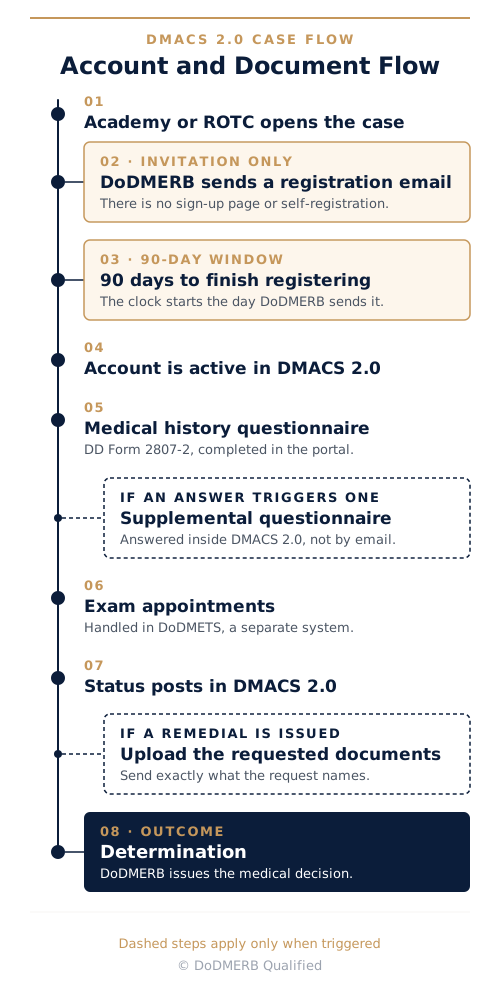
- You cannot create a DMACS account yourself. DoDMERB sends the invitation after your student's commissioning program opens the medical case.
- Once that registration email is sent, there is a 90-day window to finish registering.
- Seeing two different government web addresses during sign-in is normal and expected.
- DoDMERB builds its medical picture from what your student reports on the DD Form 2807-2, plus records it specifically asks for afterward.
- DMACS 2.0 and DoDMETS are two separate systems with two separate sets of credentials.
- The current applicant address is ready2serve.dmacs.health.mil. The old dodmerb.tricare.osd.mil address is gone.
What DMACS 2.0 Is, and Why It Replaced the Old DoDMERB Portal
The government's own DMACS 2.0 page tells a visitor who has not signed in absolutely nothing. DMACS stands for Defense Medical Accessions Computing System, and it is owned by the Defense Health Agency. Its job is to let DoDMERB collect medical examination files from applicants to commissioning programs, evaluate those files, and reach a medical qualification determination.
Nothing about DMACS 2.0 collects information DoDMERB did not collect before. The actual points of collection are still the DD Form 2807-2, the Accessions Medical Pre-screen Report Approval, and the DD Form 2808, the Report of Medical Examination. DMACS stores those documents, routes them to the right reviewer, and shows the applicant where the file stands. It is a computing system, not a form and not a medical standard.
What did change in August 2025 was the address and the platform underneath it. DMACS 2.0 replaced dodmerb.tricare.osd.mil, and that old address no longer resolves. Bookmarks and older printed packets pointing there do not redirect. They fail to load, which is why some families arrive convinced their access was revoked. The current applicant portal is ready2serve.dmacs.health.mil.
The platform now carries applicants, DoDMERB case managers, commissioning programs, and waiver authorities on one system, which is why the questionnaire, the document exchange, and the status all now sit in one place instead of being scattered across separate channels. The table below separates what moved from what stayed exactly where it was.
| Element | What changed | Where it happens now |
|---|---|---|
| Portal address | Replaced in August 2025 | ready2serve.dmacs.health.mil |
| Medical history questionnaire | Now completed inside the portal | DD Form 2807-2 in DMACS 2.0 |
| Exam scheduling | Unchanged, still a separate system | DoDMETS, run by the exam contractor |
| The medical standards themselves | Unchanged | DoDI 6130.03 |
| Who makes the determination | Unchanged | A DoDMERB reviewer |
DMACS 2.0 is an address change and a workflow consolidation. It is not a new rulebook.
Why DMACS 2.0 Login Sends You to Two Different Web Addresses
You click sign in on one government address and land on a completely different one. Both are real, and the handoff between them is the login working correctly.
Two hostnames are involved in a DMACS 2.0 login. The first is ready2serve.dmacs.health.mil, the applicant application itself, where the questionnaire, the status, and the uploads live. The second is dmacsauth.csd.disa.mil, a separate sign-in service whose only job is to confirm who you are.
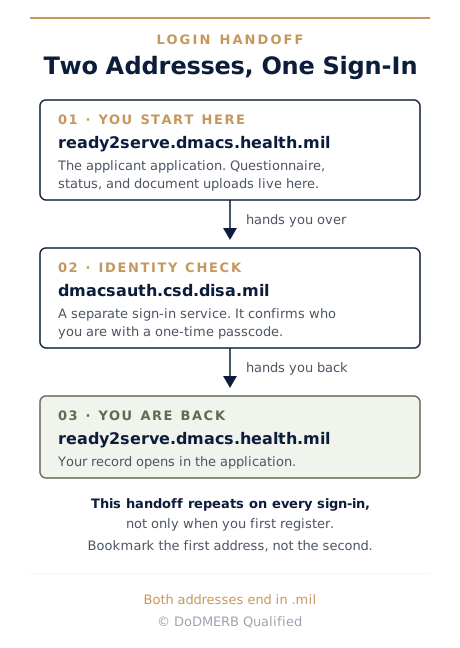
The Defense Department does not build a fresh password system for every application it runs. Identity checking is handled by shared sign-in infrastructure used across many systems, so the application hands you over to that service, the service confirms your identity with a one-time passcode, and then it hands you back with proof, at which point the application opens your record. Every sign-in repeats that handoff, including the ones months after registration.
Bookmark ready2serve.dmacs.health.mil, not the sign-in address. Families who save the second hostname end up starting at an identity service with no obvious way back to the portal, which looks like a broken account and is not one.
The practical safety check takes two seconds. Both addresses end in .mil. A sign-in flow that sends you to a commercial domain, or that asks for payment or a Social Security number to unlock an account, is not this system. If the sign-in fails right after you enter the passcode, that is a common failure point at this handoff, and the troubleshooting section further down covers what to try.
How You Get a DMACS Account: Invitation Only, and a 90-Day Clock
There is no way to create a DMACS account, and there is no sign-up page. That is deliberate, not an oversight.
The account is issued, not requested. A service academy, ROTC detachment, or other officer accession program forwards your student's name to DoDMERB, which opens the case and sends a registration email containing a link unique to that candidate. Clicking that link is the only route in. The link belongs to one applicant and one case, so it cannot be reused, shared with a sibling, or applied to a second program.
That design changes what a missing email means. In most cases, no email is information about where the commissioning program sits in its own process, not evidence that DMACS is broken or that your student was passed over. Applying to a program and having that program initiate the medical case are two separate events, and they can be weeks apart. Once the registration email is sent, there is a 90-day window to complete registration.
If no case exists yet, the useful conversation is with the program, not with DoDMERB. Admissions offices and ROTC detachments know where a candidate sits in their own sequence, and DoDMERB cannot open a case that has not been sent to it.
If the window lapses, the fix is a new registration email, and the request goes to the DoDMERB helpdesk at dha.ncr.dod-merb.mbx.helpdesk@health.mil. That is the case-side address, and it is the right one for anything about the registration window itself. The click path from that email through the passcode step and profile setup is already documented step by step, so this guide does not repeat it.
Related: The DoDMERB Portal Guide: DMACS and DoDMETS Step by Step
If you are holding the registration email, that guide is your next click. If you are still waiting on it, the troubleshooting section below is.
What Lives Inside the DMACS Portal
Four things live inside DMACS 2.0, and knowing which four saves you from hunting for a fifth that was never there. The first is the DD Form 2807-2, the medical history prescreen your student completes in their own words. The second is any supplemental questionnaire the system generates from those answers. The third is document uploads, covered below. The fourth is status, which is where both processing milestones and final determinations appear.
A supplemental questionnaire is a condition-specific follow-up triggered by a "yes" answer on the prescreen, an asthma questionnaire or a food-allergy questionnaire for example. Most families have never heard of them. It is generated automatically from what was reported, and it renders as additional questions inside DMACS 2.0 itself. It is not a paper form, and it is not emailed to a helpdesk. An unanswered supplemental questionnaire sitting in the portal will hold a case still while the family watches an inbox that is never going to ring.
Everything about scheduling the physical and eye appointments happens somewhere else. DoDMETS is a separate system, run by the exam contractor, CIV Team, with its own separate credentials issued after the questionnaire is submitted. Two systems means two sets of sign-in details, and losing track of which one you are looking at is one of the more common sources of confusion in the whole process. For the full two-system walkthrough see the DoDMERB portal guide, and for the appointments themselves see what to expect at the DoDMERB exam.
| DMACS 2.0 | DoDMETS | |
|---|---|---|
| What it is for | Medical history, status, uploads | Scheduling the exam appointments |
| Who runs it | Defense Health Agency, for DoDMERB | CIV Team, the exam contractor |
| What you do there | Answer questionnaires, upload requested documents, check status | Book and confirm appointment times |
| Credentials | Issued by DoDMERB registration email | Issued separately after the questionnaire |
One system tells you where the file stands. The other tells you where to be and when.
MHS GENESIS and DoDMERB: Where Your Student's Medical Information Actually Comes From
DoDMERB builds its picture of an applicant's health from what that applicant reports on the DD Form 2807-2, plus the specific records DoDMERB asks for after reading it. It does not use MHS GENESIS or any other electronic health record system to pull a chart on its own.
Families are hearing that DMACS 2.0 now reaches into civilian medical and prescription history automatically and that self-reporting is finished. That is not how the system works.
Because the file is built from the self-report, the self-report is the case. A gap in what your student writes on that questionnaire is a gap in the record the reviewer is working from, and there is no second copy sitting somewhere to fill it in. That is the reason accuracy matters more here, not less.
A disclosed condition is a workable problem. Reviewers read disclosed histories constantly, and the point of the review is to reach a qualification decision that can be documented and defended. A condition reported in the right place, at the right time, with dates and treatment and outcome attached, is a question the process is built to answer.
An omission is a different kind of problem. It surfaces later, when there is less room on the calendar and less opportunity to supply context, and it turns into a question about the applicant rather than a question about a medical condition. Your student is applying to become an officer. Full disclosure with proper documentation is the strong path, and it is the one that matches the standard they are asking to be held to.
"Records DoDMERB asks for" is narrower than most families expect. When something reported on the questionnaire needs more detail, one of two things happens. DMACS 2.0 generates a supplemental questionnaire, or DoDMERB issues a remedial request naming the documents it wants. Those requests are specific. They name the condition, the timeframe, and the type of documentation, and the correct response is to answer that list and nothing beyond it.
Self-report is how the picture gets built. That makes accuracy the whole job.
DMACS 2.0 Status Meanings, Including "Complete on Hold"
The labels inside DMACS 2.0 were written for the people who process the file, not for the family reading it. DoDMERB does not publish a glossary of them, so what follows is what they mean in practice. Two different things get called status. One tracks whether the exam paperwork has physically reached DoDMERB. The other is the qualification determination DoDMERB reaches after reading it.
Families read a paperwork label as a verdict and panic, or read a verdict as a paperwork milestone and wait for something that is not coming.
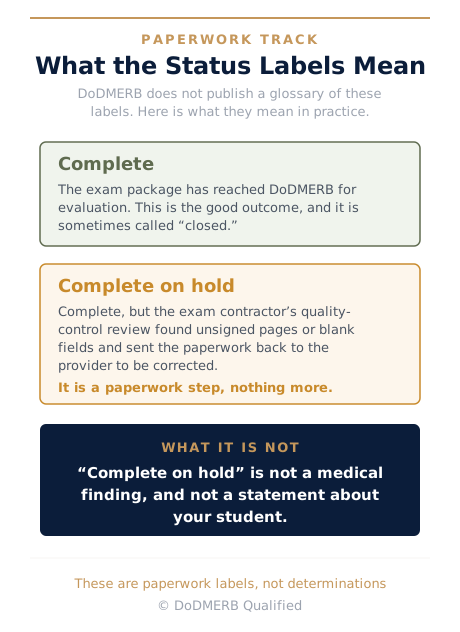
On the paperwork track, "Complete" means the exam file has reached DoDMERB and is there to be evaluated. That is the good one, and it is the one to watch for.
"Complete on hold" means the file is finished but the exam contractor's quality-control review found something unfinished in the paperwork, an unsigned page or a blank field, and sent it back to the provider to be corrected. It is a paperwork step. It is not a medical finding, and it is not a statement about your student.
On the determination track there are three outcomes. Qualified means your student meets the medical standards. Remedial means DoDMERB needs more information before it can decide. Disqualified means a specific standard was not met, which is the beginning of the waiver conversation rather than the end of the process. A determination usually arrives attached to a code, and the disqualification code lookup will tell you what that code refers to. Our guide to remedials versus disqualifications covers what each one asks of you.
| Label | What it means in practice | What to do now |
|---|---|---|
| Complete | The exam file has reached DoDMERB for evaluation | Wait. Keep your contact details current |
| Complete on hold | Quality control found unfinished paperwork and returned it to the provider | Wait. This is a paperwork correction, not a finding |
| Qualified | Medical standards are met | Nothing further on the medical side |
| Remedial | DoDMERB needs specific additional information | Upload exactly what was requested |
| Disqualified | A specific standard was not met | Read the determination, then look at waiver options |
If the label is on the paperwork track, the action is to wait and make sure DoDMERB has current contact details. If it is a determination, the next two sections are where to go.
DoDMERB Qualified
You can read the status and still not know what to do next.
Our DoDMERB course walks families through what each determination means, what documentation actually helps, and how the waiver decision gets made.
Uploading Documents in DMACS 2.0: What Belongs There
One habit makes uploads go smoothly. Send exactly what was asked for, all at once.
Requests are specific. A remedial or an information request names the documents it wants, so read it as a list and answer the list. Partial uploads sent over several days restart review attention each time, which adds calendar days for no benefit. Name and order what you send so a reviewer can match each document to the item it answers.
Unrequested records are the quieter mistake. Every page uploaded gets read, and extra pages can surface a condition nobody asked about, which generates a fresh request and more delay. Keep your student's records organized at home so they are ready if a remedial arrives, and send only the ones named in it.
Waiver documentation is a different question entirely, decided by a different authority, once the case moves past determination. The upload mechanics themselves, file handling and where outstanding actions appear on screen, are covered in our portal guide.
Related: How the DoDMERB Waiver Process Works
A request list is what this section is for. Once the case moves past determination and into waiver review, that guide takes over.
Common DMACS 2.0 Problems and What They Actually Mean
Most DMACS problems look identical from the outside: a screen that will not open. What differs is who can fix it, and in three of the four common cases the software is working fine.
Before you assume DMACS is broken:
- Check spam and promotions folders for the registration email.
- Confirm which email address the program gave DoDMERB, and that someone actually monitors it.
- Confirm the commissioning program has initiated the medical case, which is a separate event from applying.
- Check whether the registration email arrived more than 90 days ago.
The registration email never arrived
Usually this means the case has not been opened yet, or the address on file is not the one being watched. If the address on file is a school-issued student account, check its spam and quarantine folders too, since school mail systems can filter outside mail before a student ever sees it. Registration emails have also failed to reach families outright, so this is a real category and not automatically user error. Work the checklist first, then email dha.ncr.dod-merb.mbx.helpdesk@health.mil and ask for a new registration email to be issued.
The account is locked, or the registration window lapsed
A reactivation path exists, and the helpdesk can issue a fresh registration email when the window has closed. Send window and case questions to dha.ncr.dod-merb.mbx.helpdesk@health.mil. Repeated sign-in attempts after the first few failures rarely help and can compound the problem, so stop and send the email instead.
Sign-in fails after the one-time passcode
An authentication or session error can appear right after the passcode step, at the handoff between the two hostnames described earlier. Request a fresh sign-in link rather than reusing an older one, clear the browser cache or try a different browser, and open the link in a full browser rather than inside an email or social app's built-in browser. For password and sign-in problems specifically, the address is dha.ncr.dod-merb.mbx.webmaster@health.mil.
Something displays blank, or an upload will not go through
Both have documented behavior and workarounds in our portal guide, including the assigned clinic field that can display empty after the questionnaire is submitted.
| What you see | What it usually means | Who to contact |
|---|---|---|
| No registration email | Case not opened yet, or wrong address on file | The helpdesk address |
| Account locked or window expired | Registration was not completed in time | The helpdesk address |
| Error right after the passcode | A sign-in session problem, not a case problem | The webmaster address |
| Blank field or a failed upload | A known display or file issue | See the portal guide first |
| Status has not moved in weeks | Normal processing time | Nobody. Keep contact details current |
Email is also the fastest way to get an answer once you do need one. Case managers work through their queues by email and typically reply within one to two business days, which is quicker than most families expect and quicker than waiting for a status to move on its own.
Most of what looks like a broken portal is a timing question or a contact-details question. Both have a short path to an answer, and neither requires panic.
Frequently Asked Questions About DMACS 2.0
What does DMACS stand for?
Defense Medical Accessions Computing System. It is the Defense Health Agency system DoDMERB uses to collect and evaluate applicant medical files for commissioning programs. The system stores documents and routes them to reviewers. It does not set the medical standards those documents are judged against. The "2.0" refers to the platform generation that replaced the older DoDMERB portal in August 2025.
What is the DMACS 2.0 login address?
ready2serve.dmacs.health.mil is the applicant portal. When you sign in, the portal hands you off to a separate Defense Department sign-in service at a different .mil address, which confirms your identity and returns you to the portal. That handoff is expected behavior, not a broken link. Bookmark the portal address, not the sign-in one.
Why can I not create a DMACS account myself?
There is no self-registration, by design. DoDMERB issues the account after a service academy, ROTC detachment, or other commissioning program opens the medical case, and it does so by emailing a registration link unique to that applicant. That link is the only way in, and it cannot be shared or reused.
My DMACS registration email never arrived. What should I do?
Check spam, confirm which email address the program gave DoDMERB, and confirm the program has actually initiated the medical case. If it has, email dha.ncr.dod-merb.mbx.helpdesk@health.mil and request a new registration email. The 90-day registration window runs from the send date, not from the day you find the message.
Does DMACS 2.0 pull civilian medical records automatically?
No. DoDMERB works from your student's own DD Form 2807-2 self-report, plus the specific records it requests afterward. It does not use MHS GENESIS or any other electronic health record system to pull a chart. Complete and accurate self-report is still required, and it is still the foundation of the case.
What does "Complete on hold" mean in DMACS?
In practice, the exam file is finished but the contractor's quality-control review found unfinished paperwork, such as an unsigned page or a blank field, and sent it back to the provider to correct. It is a paperwork step, not a medical finding, and not a determination about your student.
Is DMACS 2.0 the same as DoDMETS?
No. DMACS 2.0 holds the medical history questionnaire, the status, and document uploads. DoDMETS is a separate contractor-run system used only to schedule the physical and eye exam appointments, with its own credentials. Our portal guide walks through both in order.
What happened to dodmerb.tricare.osd.mil?
It was replaced by DMACS 2.0 in August 2025, and the address no longer loads at all. There is no redirect. Old bookmarks, older printed instructions, and older articles pointing to it will simply fail, which is why families sometimes assume their access was revoked.
My DMACS account is locked. Who do I contact?
For password and sign-in problems, email dha.ncr.dod-merb.mbx.webmaster@health.mil. For case questions or an expired registration window, email dha.ncr.dod-merb.mbx.helpdesk@health.mil. A reactivation path exists, and the helpdesk can reissue a registration email if the window has closed. Include your student's full name and the commissioning program in the message so the case can be found quickly.